Guided demo before purchase 30-day money-back guarantee Human support at support@editsoum.ch
For Swiss construction & trade professionals

Fill out tender PDFs in minutes, not hours.

EditSoum finds every price field in your soumission automatically, computes all line totals, chapters, discounts and VAT for you, and writes your prices in clean blue ink over the original PDF — like a pen, but without a single calculation error.

PDFs and prices stay local Monthly or annual · cancel renewal Real text output, not images Windows 10 / 11
Time per tender
−90%
typical, vs. filling by hand
Calculation errors
0
every total computed for you
Plans from
{MONTHLY}
per month · one active computer
PDF data uploaded
None
only the license status is checked online
Built for real tender work

Your PDF format can change. Your workflow does not.

EditSoum combines automatic detection with precise manual control, so you can finish the job even when a client sends an unusual document.

Electrical & technical trades

Long position tables, quantities, unit prices, carry-overs and chapter totals handled in one workspace.

🏗

Construction & renovation

CRB/NPK-style tenders, highlighted cells, PDF forms and scanned pages — without rebuilding them in Excel.

🧰

SMEs & estimating teams

Reusable learned layouts, shared optional templates and CSV export for a faster, consistent quoting process.

Designed for control: missed fields can always be added, moved or reclassified; inconsistent totals are flagged, never silently changed.
Why EditSoum

Get your afternoon back.

Filling a multi-page soumission by hand means retyping positions into a spreadsheet, punching a calculator, carrying totals from page to page, and re-checking the VAT twice. EditSoum removes everything except the one thing only you can do: deciding your prices.

  • You only type unit prices.Line totals, chapter subtotals, carry-overs, discount, early-payment discount, prorata and VAT are computed instantly.
  • No transcription errors.Values are written directly onto the original PDF — nothing is copied between documents by hand.
  • Reopen in one second.Your work is saved automatically; the same document opens again instantly, ready to adjust and resend.

Time to fill a typical tender

Multi-page soumission, ~100 positions

By hand ~60 min EditSoum ~6 min −90% of your time 0 30 min 60 min

Illustrative comparison — your exact numbers depend on the document. The point stands: everything except typing your prices disappears.

How it works

Four steps. The math does itself.

From the PDF your client sends you to the PDF you send back — without leaving the app.

1

Open your PDF

Drag & drop the tender. Every price line, table cell, box and checkbox is detected automatically — even on scanned documents.

2

Type your prices

Press Enter to jump to the next field. Quantities are recognised; every dependent amount updates live as you type.

3

Review with a safety net

Amounts are cross-checked (unit × qty, subtotals, grand total). Anything inconsistent is flagged in amber — never silently corrected.

4

Save & send

Your values are written as real text over the original page. Dotted lines and layout stay untouched — exactly as if filled by pen.

See it in action

This is EditSoum — the real app at work.

A sample soumission opened in EditSoum: 42 fields found automatically. Only the unit prices were typed — every line total and the grand total were computed and written in blue by the app.
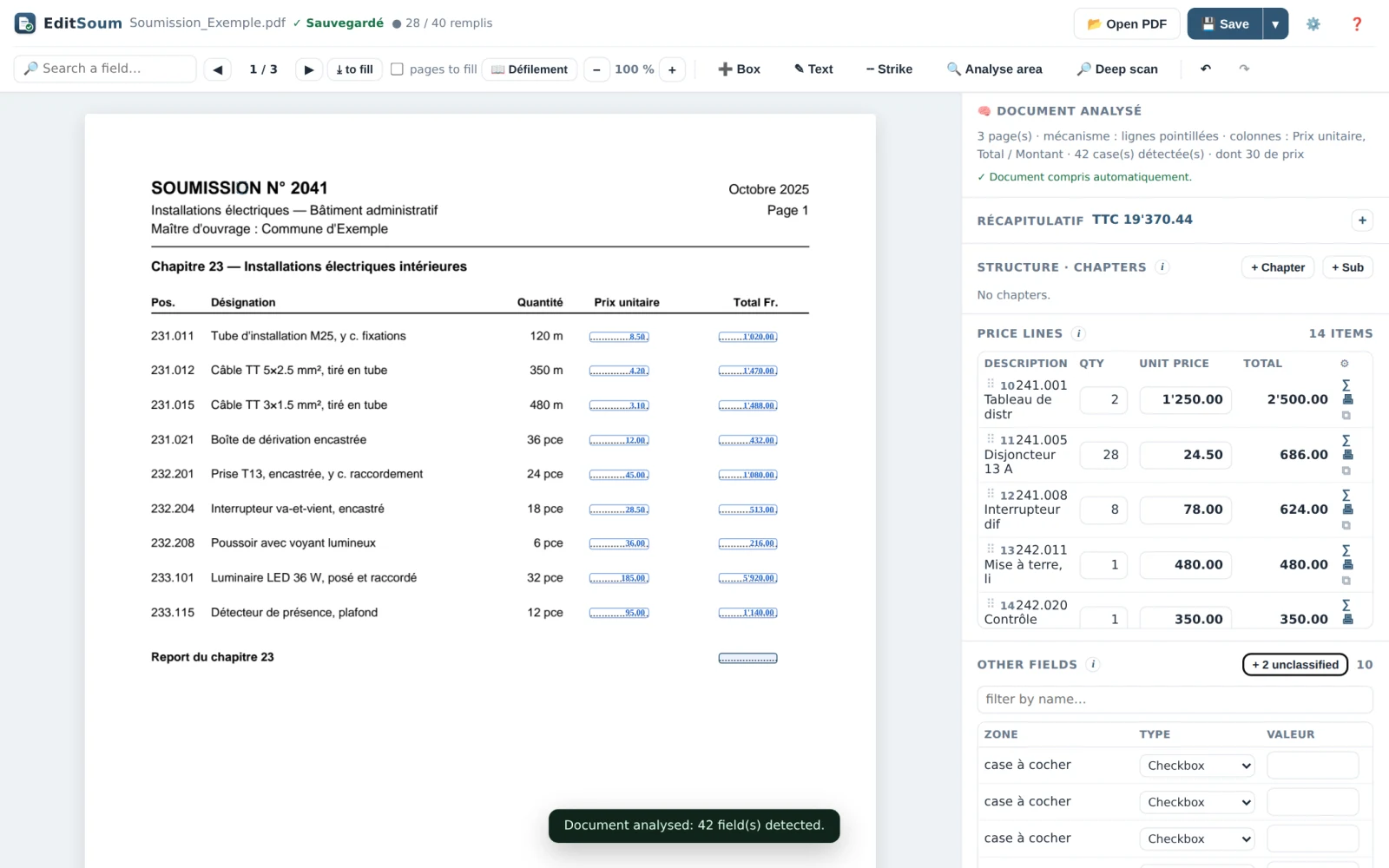
EditSoum application showing a sample Swiss tender PDF with automatically detected price fields, values written in blue ink, and the live totals panel
The document, untouchedYour PDF is displayed as-is; detected fields are simply laid over it, ready to fill.
Price lines at a glanceThe side panel lists every position with quantity, unit price and live line total.
Running total, always visibleThe grand total including VAT updates with every keystroke — no calculator needed.
A concrete example

Try the math yourself — right here.

This is what a filled soumission looks like in EditSoum. The blue values are the "pen ink". Change any unit price below and watch every total, the discount and the VAT recompute instantly — exactly like in the app.

Soumission n° 2041 — Electrical worksPage 12 / 24
Pos.DescriptionQtyUnit priceTotal CHF
231.011 Cable conduit M25, incl. fixing 120 m 1’020.00
231.012 Cable TT 5×2.5 mm², laid in conduit 350 m 1’470.00
232.201 Socket outlet T13, flush-mounted 24 pcs 1’080.00
Subtotal chapter 23 — Electrical installations auto 3’570.00
Total excl. VAT3’570.00
Discount −5%−178.50
Early payment −2%−67.83
VAT 8.1%+269.22
TOTAL incl. VATCHF 3’592.89

Click a blue unit price and type a new value — everything below it follows.

In the real app: fields are found for you on the actual PDF
Chapters up to 7 levels, each with its own subtotal
Carry-overs (report / à reporter) handled across pages
Everything included

Every feature. One small price.

No tiers and no add-ons. Monthly and annual plans include exactly the same features.

Finds the fields for you

Automatic field detection

Dotted lines, underscores, table cells, "Fr. / CHF" anchors, framed & highlighted boxes, placeholder cells ("0.00", "− CHF") and PDF form fields — found on opening.

Works on scanned PDFs

Built-in computer vision plus optional OCR give scanned tenders a text layer — deskewed and rendered at high resolution first for accuracy.

Multilingual documents

Column headers and labels are understood in French, German, Italian and English — and propagated to continuation pages without headers.

Add anything, anywhere

Missed field? Draw a zone and it becomes editable. Add free text boxes, tick checkboxes with one click, or strike through a line in blue.

Deep analysis on demand

One click re-analyses up to 40 pages in depth when a complex document needs a second, more thorough pass.

Quantities recognised

Printed quantities are read automatically, so line totals can be computed the moment you enter a unit price.

Does the math — and checks it

Live totals, VAT & discounts

Qty × unit price, chapter subtotals, grand total, discount (rabais), early-payment discount (escompte), prorata and VAT — all recomputed as you type.

Cross-checking, not auto-fixing

If a written total doesn't match qty × price, or a grand total doesn't match its parts, it's flagged in amber. EditSoum warns — you stay in control.

Chapters & carry-overs

A chapter tree up to 7 levels deep, per-chapter subtotals shown inline, and page-to-page carry-overs (report / à reporter) filled consistently.

Output that looks hand-signed, behaves digital

Pen-style blue ink

Bold blue values, placed right on the line, auto-shrunk to fit the box. The original dots, lines and layout are never erased.

Real text, not an image

The saved PDF contains genuine text: it stays sharp at any zoom, prints perfectly, and can be searched and copied by your client.

Original always safe

A pristine copy of the untouched original is kept automatically. Reopen a saved project and every value is still editable — no doubled-up prices.

Built for daily use

Fast — and instant on reopen

The window is ready in about a second; fields appear progressively while analysis runs. Reopening a known document is instantaneous.

Comfortable reading

Crisp rendering, zoom with Ctrl + mouse wheel, continuous or page-by-page mode, search across the whole document, click a field in the list to jump to it.

Autosave, undo & templates

Work is saved automatically and restored on reopen. Full undo/redo. Recurring tender types are learned and pre-filled as templates — automatically.

CSV export

Export all positions and prices to CSV for your accounting or ERP in one click.

Interface in EN / FR / IT / DE

Switch the app language in Settings. The documents themselves can be in FR, DE, IT or EN.

Never lose work

Closing with unsaved changes always asks first. The backend is hardened so the app doesn't crash — even on malformed documents.

Private by design

Your prices are your business.
They never leave your computer.

Detection, calculations and PDF writing run on your PC. Your documents and prices are never uploaded. A small encrypted request verifies the subscription periodically.

Documents stay offline

Detection, calculation and PDF writing happen locally. No tender page or price is sent to the license service.

No account before purchase

The checkout asks only for the email and billing details needed for the purchase. There is no app login or document sync.

Resilient license check

After activation the app refreshes a signed entitlement every 24 hours and can continue offline for up to 72 hours within the paid period.

Pricing

One plan. Choose your billing period.

Cheaper than redoing a single tender by hand — and it pays for itself the very first time.

One active computer
CHF79.90
per year · save 16.7% · 2 months free
Shown in your currency. You're charged in that currency at checkout; any VAT is calculated there.
  • All features included — detection, calculations, scans/OCR, templates, export. No "pro" tier.
  • Flexible renewal — monthly or annual billing; cancel future renewal from the customer portal.
  • One active computer — release the license in settings before moving it to another PC.
  • Unlimited documents — fill 5 tenders or 5,000. Same price.
  • Automatic delivery — the activation code is emailed after confirmed payment.
Buy EditSoum — {PRICE}

Secure checkout · TWINT, credit card, Apple Pay & Google Pay

✓ 30-day money-back guarantee — one e-mail, full refund, no questions asked.

1

Pay {PRICE}

Quick secure checkout — no account needed.

2

Receive your code

Your personal activation code arrives automatically by email.

3

Activate & work

Enter the code once. The paid period and renewals are then checked automatically.

Download EditSoum for Windows

Free download · guided product demo before purchase · an active subscription is required to open customer PDFs · Windows 10/11, 64-bit

Questions & answers

Frequently asked questions

What is included in the monthly and annual plans?
Both plans include every feature, unlimited documents, updates and one active computer. Annual billing costs {ANNUAL}, equal to ten monthly payments: two months free and a 16.7% saving.
Does my data ever leave my computer?
Your PDFs, prices and projects never leave your computer. The app only sends a pseudonymous device identifier, app version and subscription requests to the license service; no document content or telemetry is uploaded.
Which documents does it work with?
Swiss construction tenders and quote forms (soumissions / devis / Offertformulare) in PDF format — including CRB/NPK-style position tables, free-form quote sheets, PDF forms, and scanned documents thanks to built-in vision and optional OCR. Documents can be in French, German, Italian or English.
What if a field isn't detected automatically?
You're never stuck: draw a rectangle over any zone and it becomes an editable field, use "Deep analysis" for a more thorough pass over the whole document, or add a free text box anywhere on the page. Once you've arranged a document type, EditSoum remembers the layout as a template and applies it automatically next time.
Does it modify the original PDF?
Your saved file is a new PDF with your values written on top as real text — the original document's lines, dotted leaders and layout are never erased or altered, and a pristine copy of the untouched original is kept automatically.
What are the system requirements?
Windows 10 or 11 (64-bit). Internet is required for activation and periodic subscription verification. After a successful check the app can work offline for up to 72 hours within the paid period.
How do I get and use my activation code?
After confirmed payment your code is sent automatically by email. Enter it in EditSoum to bind one computer. To change computer, release the old device from Settings or contact support if it is no longer accessible.
Can I try it before buying?
Yes — download the app for free and take the built-in guided tour, which shows the whole workflow on example pages. Questions before you buy? Write to support@editsoum.ch — we're happy to check that EditSoum fits your documents.
Which payment methods are accepted?
Checkout is handled by the secure payment provider shown before purchase. Available methods depend on your country and device. EditSoum never receives or stores your card number.
Which currency am I charged in? Is VAT included?
Pick your currency at the top of the pricing box — CHF, EUR, USD or GBP — and the price is shown in it. At checkout you're charged in that currency, and any VAT or sales tax that applies to your country is calculated and shown before you confirm. No surprises after payment.
Can I try it first? And what if it doesn't work for me?
The free download includes the complete guided demonstration. Customer PDFs require an active subscription. A 30-day commercial guarantee is also offered: contact support@editsoum.ch if the product does not fit your documents, subject to the refund terms.

Stop retyping. Start pricing.

The next tender on your desk could be done in minutes — with totals, discounts and VAT calculated and cross-checked as you type.

Get EditSoum — from {MONTHLY}/month

Monthly or annual · one active computer · documents remain local

Guided demo Buy — {PRICE}